The short answer
Maybe you’ve got a folder of receipts and a bank statement you keep meaning to sort out, and you’re wondering which app would actually make it easier.
The best bookkeeping software for most freelancers and one-person businesses in 2026 is a free one. If you want your business bank account, bookkeeping and tax set-aside in one app, use Found ($0). If you’d rather keep your current bank, Wave Pro ($19/month) and QuickBooks Solopreneur Lite ($20/month) are the cheapest paid apps that pull in your bank transactions automatically (QuickBooks Solopreneur’s free plan also connects one bank account, but caps invoices, receipts and mileage). Pick FreshBooks if invoicing is most of your admin, and Xero or QuickBooks Online (a separate, pricier product) if you’re growing toward an S-corpA tax status a business can elect. You pay yourself a salary through payroll, and profit above it skips Social Security and Medicare tax. with an accountant.
Whichever you choose, the habit matters more than the app. What really keeps you on track is a regular routine of labeling transactions and saving receipts. With a simple setup that you keep up to date, that can be as little as 15 minutes a month; more clients, more transactions or a messy backlog will take longer.
Check current pricing
What it costs
2026 list prices, per month
What bookkeeping software costs
Lowest plan without usage caps, before promos and sales tax. Prices change; check each vendor’s site.
These are the regular monthly list prices as of October 2026. Most paid apps give you a discount for the first few months, then charge the full price, so it’s worth budgeting for the full number.
Side by side
Here’s how the options compare on the features that matter most to a business of one.
| Option | Price | Imports bank transactions | Receipts and mileage | Best for |
|---|---|---|---|---|
| A spreadsheet | $0 | No (paste in a bank download) | By hand | Fewer than about 20 transactions a month |
| Found | $0 (Plus: $35/month) | It is your business account; Plus also imports other accounts | Both included | Sole proprietors who want banking, bookkeeping and tax savings in one place |
| Wave | Starter $0; Pro $19/month or $190/year | Pro only | Receipts in Pro; no mileage | The cheapest real bookkeeping app, plus free invoicing |
| QuickBooks Solopreneur | Free plan; Lite $20/month for unlimited receipts and mileage | Yes (1 account on the free plan) | Both; the free plan caps receipts at 2 and mileage at 5 trips a month, Lite removes the caps | Sole proprietors who want deductions sorted for Schedule C (no accountant access on Free or Lite) |
| QuickBooks Online | Simple Start $38/month (includes access for 2 accountants) | Yes | Check the plan details | Owners who want an accountant working inside their books, including S-corps |
| FreshBooks | Lite $23/month (5 clients); Plus $43/month (50 clients) | Yes | Mileage on all plans; receipt capture from Plus | Service businesses that send lots of invoices and track time |
| Xero | Early $27/month (20 invoices); Growing $59/month. New customers get 80% off the first 6 months through our link (checked November 11, 2026) | Yes (automatic matching is a $5/month add-on on Early) | Receipts yes; mileage on the top plan | Growing businesses and S-corps that work with an accountant |
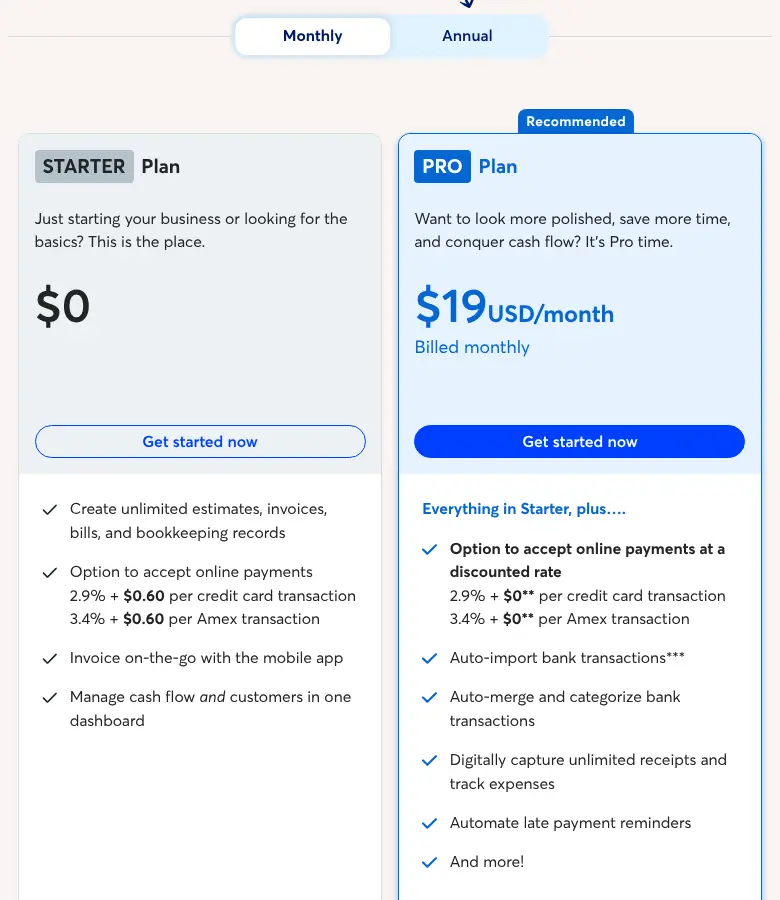
Our Wave accounting review goes through what the free Starter plan still covers and what a year of Pro really costs.
Find your fit
Which bookkeeping app fits you?
Answer a few quick questions to see what most people in your spot pick.
Most people in your spot go with
Xero or QuickBooks Online
Your tax preparer will almost certainly use one of them, and both let an accountant log in to your books. Ask your preparer which one before you pick.
Most people in your spot go with
Found
It’s a free business account that sorts your spending, scans receipts, tracks mileage, estimates your taxes and moves money into a tax pocket for you, so the bank and the books come in one.
Most people in your spot go with
FreshBooks
Invoicing is where it shines. Watch the client limits: Lite covers 5 billable clients, so busy freelancers usually end up on Plus.
Most people in your spot go with
A spreadsheet
With a handful of transactions, a tab per month is enough, and our free tax spreadsheet is set up for it. If you also send invoices, Wave’s free Starter plan adds free invoicing on top.
Most people in your spot go with
Wave Pro
At $190 a year (about $16 a month), it’s the cheapest paid app that pulls in your bank transactions automatically.
Most people in your spot go with
QuickBooks Solopreneur Lite
About $20 a month, with mileage tracking and your deductions sorted the way Schedule C asks for them.
See QuickBooks Solopreneur Our QuickBooks Solopreneur review
General information based on what usually fits, not advice for your situation. We may earn a commission from some links; it never changes a pick.
Which one to pick
Find the line that sounds most like you.
- You’re just starting and don’t have a business account yet: Found. It’s a free business account that sorts your spending into categories, scans receipts, tracks mileage, estimates your taxes and moves money into a tax pocket for you. Found is a financial technology company; the bank account is provided by Lead Bank, Member FDICThe U.S. agency that insures bank deposits up to $250,000 per depositor, per bank, if the bank fails..
- You already have a business bank account you like: Wave Pro if price matters most ($190 a year works out to about $16 a month), or QuickBooks Solopreneur Lite if you want mileage tracking and deductions organized the way Schedule CThe tax form where you report your business income and expenses. Its bottom line is your profit. asks for them. Our QuickBooks Solopreneur review covers its tax estimate and where it falls short.
- You invoice lots of clients: FreshBooks. Just watch the client limits: Lite covers 5 billable clients, so busy freelancers usually end up needing Plus. Here’s how the invoicing apps compare, and here’s FreshBooks vs. QuickBooks side by side. Our FreshBooks review adds up a year of plan and payment fees.
- You sell on Etsy, Shopify or Amazon: your deposits arrive with fees already taken out, so you need a tool that splits them. Here’s what works for online sellers.
- You have very few transactions: a spreadsheet with a tab per month is enough. If you also send invoices, Wave’s free Starter plan adds free invoicing on top.
- You’re an S-corp or about to become one: Xero or QuickBooks Online, because your tax preparer will almost certainly use one of them and both let an accountant log in to your books. QuickBooks Solopreneur is a different product built around Schedule C, and its Free and Lite plans don’t include accountant access, so talk to your preparer before you pick. Here’s when an S-corp makes sense.
What a business of one actually needs
You don’t need every feature on the pricing page. Here’s what actually earns its keep when it’s just you.
- Automatic bank import. Typing in transactions by hand is the reason people fall behind. This is the feature worth paying for.
- Categories that match your tax return, so April is just a matter of reading off totals. Here’s what you can deduct.
- Receipt capture: a photo attached to each expense, so you have proof if the IRS ever asks. If your app doesn’t read receipts, a receipt scanner app can.
- Mileage tracking if you drive for work. At 72.5 cents a mile in 2026 (76 cents from July 1), it adds up fast.
- A profit report you can check each quarter to size your estimated tax payments.
What you can probably skip: features you won’t use. Payroll matters once you’re an S-corp paying yourself a salary, inventory matters if you sell products, accountant access matters if someone else works in your books, and project tracking helps if you need to know which jobs make money. If none of those fit you yet, don’t pay extra for them.
Free vs. paid: when to upgrade
Our take: start free. Move to a paid app when your monthly bookkeeping regularly takes more than 30 minutes, or when you catch yourself skipping it. A paid app at $19 to $27 a month is a deductible business expense, so it costs you less than the sticker price. Say your combined federal income tax and self-employment taxSocial Security and Medicare tax for people who work for themselves: 15.3% on 92.35% of your profit, on top of income tax. rate on that money is about 25%: a $20 app then really costs you about $15. Your own savings depend on your tax bracketA range of income taxed at one rate. Only the income inside each range is taxed at that range’s rate. and state.
If even a paid app sits untouched, the next step up is a person. A bookkeeping service keeps the books for you from about $200 a month, and we compare six of them, with what each one leaves out.
Whatever you use, keep your tax money separate. Set aside 25 to 30% of every payment in its own account, and April gets a lot less stressful.
FAQ
Is bookkeeping software tax deductible?
Yes. Software you use for your business counts as an ordinary business expense on Schedule C.
Can I switch apps later?
Yes, and it’s less painful than it sounds. Start the new app at the beginning of a month or quarter, export your reports from the old one, and keep those exports with your records for at least 3 years.
Do I still need an accountant?
Not for day-to-day bookkeeping. Many one-person businesses use a tax preparer once a year and simply hand them the app’s profit and loss reportA summary of your income minus your expenses for a period, also called a P&L. It's the starting point for Schedule C.. Here’s what filing day looks like.
Sources
- Found pricing
- Wave pricing
- QuickBooks Solopreneur pricing
- QuickBooks Online pricing
- FreshBooks pricing
- Xero US pricing
- IRS: Recordkeeping
Prices checked October 2026 and change often; confirm on each company’s site before you sign up. General education, not tax advice. Some links on this site may be affiliate links; see our affiliate disclosure. It never changes what we recommend.