The short answer
You picked Wave because everyone called it the free accounting app. Then you went to connect your bank account, and it asked you to upgrade.
Is Wave still free?
Yes, but the free Starter plan now covers invoicing and do-it-yourself bookkeeping only. Automatic bank imports, receipt scanning and a login for your accountant take Pro, at $19 a month or $190 a year. If you’re fine uploading a bank statement once a month, Starter still does the job.
We went through Wave’s pricing page, its help center and its Trustpilot reviews in October 2026. Below is what each plan includes, what a year really costs once clients pay you online, and who Wave fits. Prices are for U.S. businesses.
Check current pricing
What Wave costs
Wave has two plans and a few add-ons. Here’s the U.S. pricing.
| Plan or add-on | Price | What you get |
|---|---|---|
| Starter | $0 | Invoices, estimates, bills, books you enter or upload yourself, reports and the mobile app |
| Pro | $19 a month, or $190 a year | Automatic bank imports, unlimited receipt scanning, extra users such as your accountant, late-payment reminders and support by chat and email |
| Receipt scanning (for Starter) | $8 a month, or $72 a year | Unlimited receipts by phone, computer or email |
| Payroll | $40 a month, plus $6 for each employee or contractor paid | Direct deposit, plus payroll tax payments and filings in all 50 states |
| A Wave bookkeeper | From $149 a month, billed yearly | A bookkeeper keeps your books for you; Pro is included |
Then there are the fees for getting paid online, which Wave charges on each payment on either plan.
- Cards: 2.9% + 60¢ per payment on Starter, or 3.4% + 60¢ for American Express. On Pro, your first 10 card payments each month skip the 60¢.
- Bank payments (ACHThe U.S. network for bank-to-bank transfers. A client paying your invoice by ACH usually costs you 1% or less, versus about 3% by card.): 1% per payment, with a $1 minimum, on both plans.
- Timing: card payments reach your bank in about 2 business days, and bank payments in 2 to 7.
There’s no free trial of Pro. You can cancel any time and keep it until the end of the period you paid for. The price is per business, so two businesses on Pro cost $380 a year.
What changed: the free plan got smaller
Wave built its name on free accounting with automatic bank feeds. On February 5, 2024, it split into Starter and Pro for new U.S. businesses, and bank connections moved to Pro.
Businesses created before then kept their old features for a while. On June 1, 2026, Wave moved those older businesses to Starter, unless they used Wave’s payments, payroll or another paid service. They lost automatic bank imports and any collaborators, such as an accountant, unless they upgraded.
Here’s what Wave’s own plan comparison shows today.
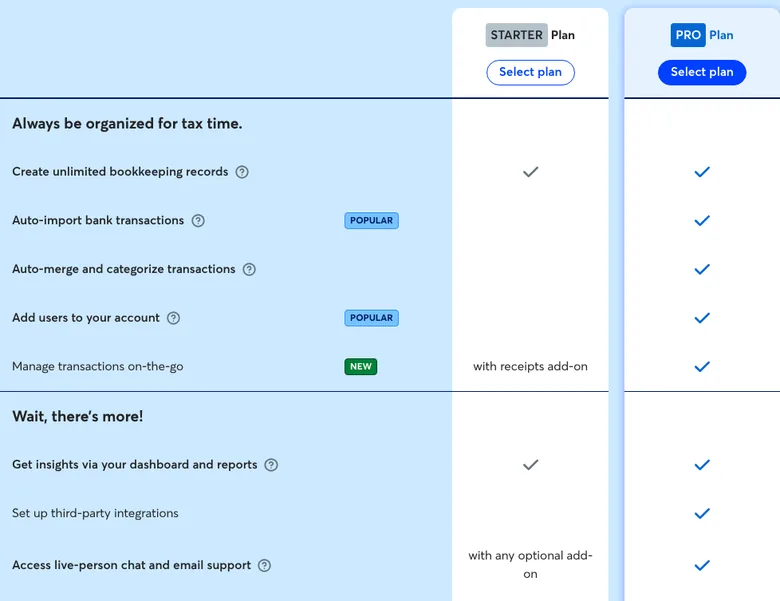
What you get on each plan
Both plans keep real double-entry accountingBookkeeping where every transaction is recorded in two accounts, such as your bank and your sales, so the books always balance. Accounting apps do it for you behind the scenes. books, with a profit and loss statementA summary of your income minus your expenses for a period, also called a P&L. It's the starting point for Schedule C., a balance sheetA snapshot of what your business owns and owes on one date, like cash in the bank and a credit card balance. Monthly bookkeeping reports pair it with the profit and loss statement. and a sales tax report. The differences are mostly about how transactions get in, and who else can see them.
| Feature | Starter | Pro |
|---|---|---|
| Invoices, estimates and bills | Unlimited | Unlimited |
| Sending invoices by email from Wave, recurring ones included, and automatic reminders | Only with Wave’s online payments turned on | Yes |
| Bank transactions | You upload statements | Imported for you |
| Receipt scanning | $8 a month add-on | Included |
| Users such as your accountant | Only a payroll manager or an H&R Block tax pro | Admin, editor or viewer |
| Amazon, Etsy and eBay sales imported | No | Yes |
| Help from a person | Only with an add-on or online payments | Chat and email |
Uploading isn’t hard. Wave takes the files most banks let you download: QuickBooks (.qbo), Quicken (.qfx), Microsoft Money (.ofx) or a CSV. Once a month fits most one-person businesses, and our simple bookkeeping routine is built around that kind of monthly sit-down.
What a year of Wave really costs
For most people who bill clients, the plan price isn’t the big number. Payment fees are. Say you’re a designer who bills four clients $1,250 a month, $60,000 a year, and every client pays online.
| Setup | Payment fees | Total a year |
|---|---|---|
| Starter, clients pay by card | $1,769 | $1,769 |
| Pro, clients pay by card | $1,740 | $1,930 |
| Starter, clients pay by bank | $600 | $600 |
| Pro, clients pay by bank | $600 | $790 |
48 payments · 2026
What $60,000 of invoices costs on Wave
Starter, freePro, $190 a year
Payment fees plus the plan, for the designer above. Wave’s prices, checked October 25, 2026.
Two things stand out. Pro’s card discount saves 60¢ on up to 10 payments a month, so the most it can ever save is $72 a year, well under its $190 price. Pro pays for itself in time saved, not in fees.
The bigger lever is how clients pay. A $1,250 bank payment costs $12.50, against $36.85 by card, so each client who pays by bank instead cuts that fee by about two thirds. Our payment fee calculator runs the same math for your own invoices.
What Wave’s users say
Wave has a 3.1 out of 5 on Trustpilot from 559 reviews (October 2026), and they split sharply: 35% give five stars and 48% give one.
The five-star reviews come mostly from one-person businesses that find Wave simpler than QuickBooks or FreshBooks for invoicing and keeping the books. A few long-time users mention losing the free bank connection.
The one-star reviews are mostly about two things: reaching support, and payments. Wave’s support team works by chat and email on weekdays, 9 to 5 Eastern, and has no phone line. Several reviewers describe card payments held for review, or saved-card charges declined, with slow replies while their money was stuck.
Wave’s payments page says it may hold funds and ask for more information during a risk review. Most payment processors can do the same, but it’s worth knowing before every client pays you through one.
Where Wave falls short
Here’s what Wave doesn’t do, on any plan.
- No mileage tracking. Wave points you to Driversnote, a separate mileage app you connect to Wave. Our mileage tracker comparison covers the options.
- No inventory counts. Wave doesn’t track units or what each one cost. Product sellers record cost of goods sold with journal entries, by hand.
- No tax estimate. Wave shows your profit but doesn’t work out the tax on it or your quarterly payments. Our quarterly tax calculator does that from your profit.
- No phone support. Everyone gets the help center and a chatbot. A person by chat or email comes with Pro, an add-on or online payments.
- No free trial of Pro. You pay from day one, though you can cancel any time.
- Not for healthcare businesses. Wave says it isn’t HIPAA compliant, so it doesn’t support them.
Wave vs. the alternatives
Here’s how Wave compares with the apps one-person businesses most often weigh it against.
| App | Free plan | Paid plan |
|---|---|---|
| Wave | Starter: invoicing and books, with statements uploaded by hand | Pro, $19 a month: bank imports and receipt scanning |
| QuickBooks Solopreneur | Connects 1 bank account; caps receipts and mileage | Lite, $20 a month: the caps come off |
| FreshBooks | None | Lite, $23 a month for 5 clients, with bank import and mileage |
| Found | $0, if it’s your business bank account | Plus, $35 a month |
| Zoho Invoice | Invoicing only, up to 500 invoices a year | No bookkeeping |
Our take: Wave Pro is the lowest-priced way we found to get automatic bank imports and unlimited receipt scanning in one accounting app. If you want the bank feed for free, QuickBooks Solopreneur’s free plan connects one account, and Found does it if you bank there. If you mostly bill clients and want phone support, FreshBooks costs more but is built around invoicing. Our bookkeeping software comparison goes deeper on each one.
Who Wave fits
Here’s how we’d sort it.
- Starter fits a one-person service business with a handful of clients that’s fine uploading a bank statement once a month. You get real books and unlimited invoices for $0.
- Pro fits the same business once the uploads get old, or once your accountant needs a login. At about $16 a month billed yearly, it costs less than QuickBooks Solopreneur Lite at $20 or FreshBooks Lite at $23.
- Wave fits less well if you drive a lot for work, sell physical products, want a phone line for support or run a healthcare business.
- S-corpA tax status a business can elect. You pay yourself a salary through payroll, and profit above it skips Social Security and Medicare tax. owners can run one-person payroll in Wave for $46 a month. Our S-corp payroll comparison shows how that stacks up.
How to sign up, switch or cancel
- Sign up free at waveapps.com or in the mobile app. Every business starts on Starter.
- Upgrade with the Upgrade now button on your dashboard. Pro covers only the business you upgrade.
- Cancel in Business settings, under Manage subscriptions. You keep Pro until the end of the period you paid for, then drop back to Starter. If you subscribed in the mobile app, cancel through the App Store or Google Play instead.
- Take your data from Business settings, under Data export. Wave emails a download link for your transactions, invoices, customers, vendors, bills and receipts, and the link works for 24 hours.
The tax side
Wave’s books are where your Schedule CThe tax form where you report your business income and expenses. Its bottom line is your profit. numbers come from, and a few features help at tax time.
- A tax line report. Added in 2026, it lets a sole proprietor assign each income and expense category to its Schedule C line, then see the totals line by line.
- Filing through H&R Block. H&R Block backs Wave, and its Block Advisors service can file your return from your Wave books. Wave sends your full-year profit and loss on the cash methodThe accounting method most one-person businesses use: income counts when you’re paid and expenses when you pay them, not when the invoice or bill is dated., so it helps to categorize and reconcile first.
- A 1099-KThe form payment apps and card processors send to report what you were paid through them. For 2026, apps and marketplaces send one over $20,000 and more than 200 payments; a traditional card merchant account reports card payments at any amount. for card payments. If clients pay by card through Wave, you get a 1099-K once those payments pass $20,000 and 200 in a year, or less in some states. Its total is before fees and still counts refunded payments. Our 1099-K guide shows how to report it so it matches.
- What you pay Wave is deductible. The Pro plan, the receipts add-on, payroll fees and payment fees are all business expenses on Schedule C. Our business expenses list shows where each one goes.
FAQ
Is Wave really free?
The Starter plan is, with unlimited invoices, estimates, bills and bookkeeping records. You pay for Pro features like bank imports and receipts, for each online payment, and for payroll or a bookkeeper if you add them.
Can Wave still connect to my bank for free?
No. Automatic bank imports need Pro. On Starter, you download statements from your bank and upload them, as .qbo, .qfx, .ofx or .csv files.
Can my accountant log in to Wave?
On Pro, as an admin, editor or viewer. On Starter you can add a payroll manager or an H&R Block tax pro, but not your own accountant, so you’d send reports or a data export instead.
Is Wave good for taxes?
It keeps the books your Schedule C comes from, and its tax line report sorts your categories by Schedule C line. It doesn’t estimate what you’ll owe; our self-employed tax calculator works that out from your profit.
Does Wave track mileage?
No. Wave points you to Driversnote, a separate mileage app that connects to it.
Is Wave safe to use?
Wave encrypts your data in transit, connects to banks read-only through Plaid and is certified as a PCI Level 1 payment provider. The more common problem in reviews is a payment hold, when Wave pauses payouts during a risk review.
Sources
- Wave: Pricing and plan comparison
- Wave Help Center: Receipts and Pro Plan subscription fees
- Wave Help Center: Plans for legacy businesses
- Wave Help Center: User types and permission levels
- Wave Help Center: Online payments processing fees and timelines
- Wave Help Center: Upload bank and credit card statements
- Wave Help Center: Set up a recurring invoice
- Wave: Payroll pricing
- Wave: Wave Advisors bookkeeping
- Wave: Get support with Wave
- Wave Help Center: How to record mileage
- Wave Help Center: Track inventory in Wave
- Wave Help Center: Tax line report
- Wave Help Center: Tax filing with Block Advisors
- Wave Help Center: Form 1099-K questions
- Wave Help Center: How Wave keeps your data secure
- Wave Help Center: Cancel a Pro or Receipts Plan subscription
- Trustpilot: Wave reviews
- IRS: Understanding your Form 1099-K
Prices and features checked October 25, 2026, for U.S. businesses. They change often, so confirm on Wave’s site before you sign up. General education, not tax advice. Our picks are never ranked by payment from the companies listed.