The short answer
A client pays you, and a quiet question follows: how much of this is really yours? Most people only find out in April, all at once.
This free self-employed tax spreadsheet answers it as you go. Log your income, expenses, miles and home office, and it works out your 2026 Schedule CThe tax form where you report your business income and expenses. Its bottom line is your profit. profit, your federal tax, how much of every payment to set aside and what to pay each quarter. It works in Excel and Google Sheets, and it’s free when you join our email list.
Get the free spreadsheet
Enter your email, then click Confirm in the email we send you. Your download page opens with the blank spreadsheet and a filled-in example, so you can see how it works first. You’ll also get a reminder a week before every quarterly IRS deadline. Unsubscribe anytime.
What’s inside
It’s one workbook with a tab for each part of your year. Here’s what each one does.
| Tab | What it does |
|---|---|
| Start Here | The steps, and your numbers at a glance. |
| About You | Your filing status, any job, spouse’s pay or Social Security, health insurance, retirement savings, tax taken from a paycheck and how far into the year you are. |
| Income | Every payment or payout, with each client’s 2026 total and a flag when a 1099-NEC is likely. |
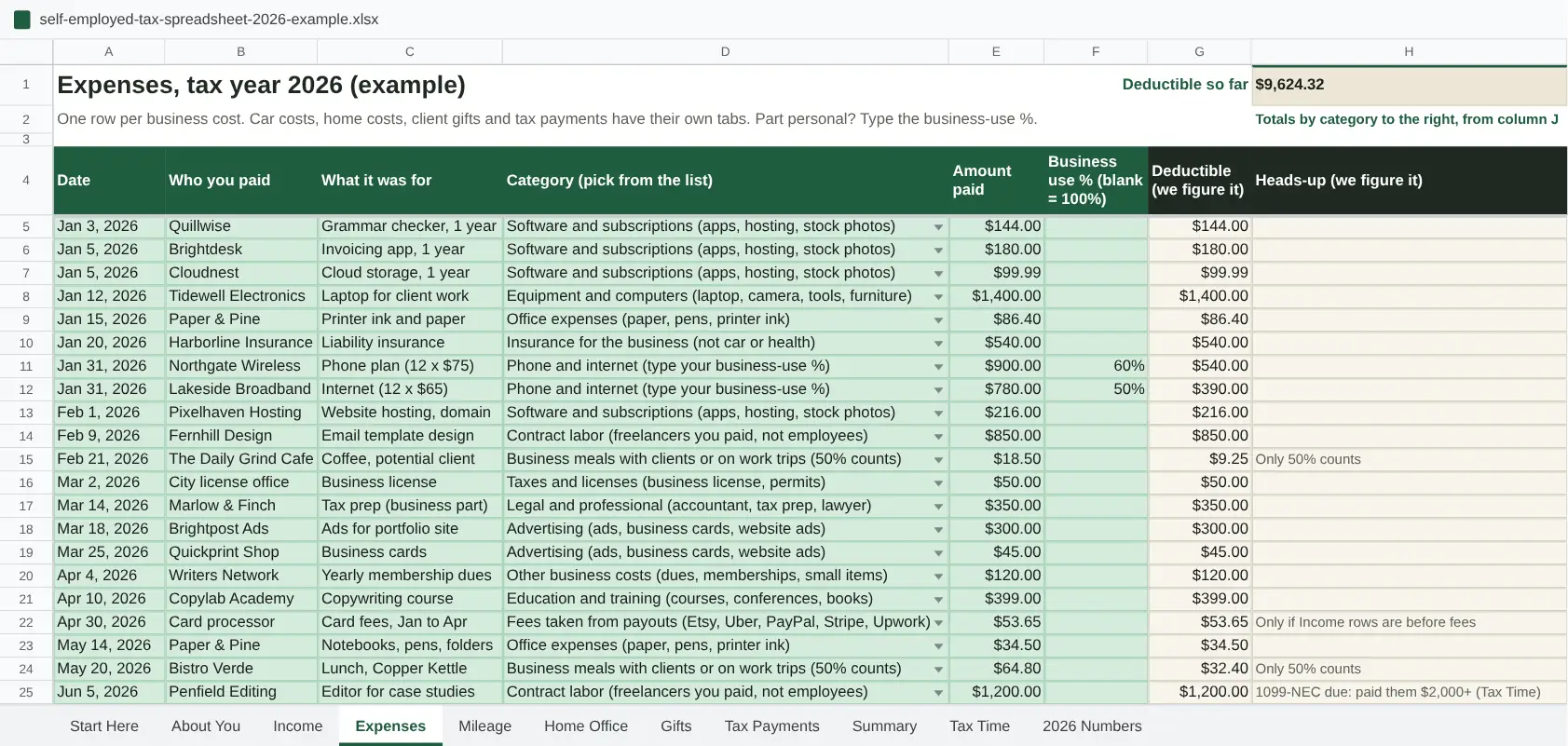
| Expenses | Your business costs, sorted into Schedule C lines. Meals are cut to 50% and equipment over $2,500 moves to line 13 for you. |
| Mileage | A trip log or monthly totals from an app, at 72.5 cents a mile through June and 76 cents from July 1. |
| Home Office | Works out both the simplified and the regular method and picks the bigger one. |
| Gifts | Client gifts, with the $25 per person limit and shipping or wrapping on top. |
| Tax Payments | Each tax payment you send the IRS or your state, with your total paid so far. The Summary shows what’s left. |
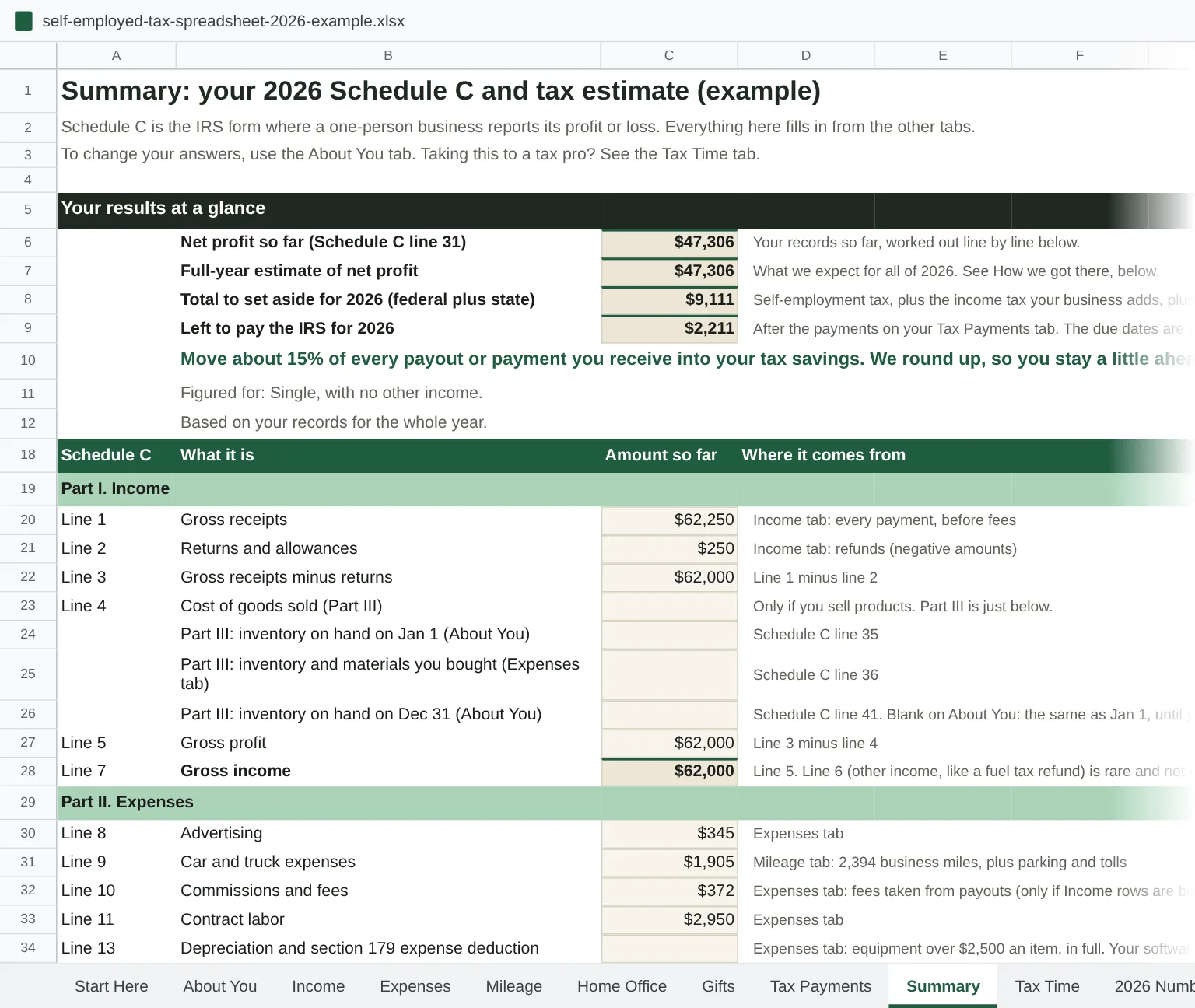
| Summary | Schedule C line by line, a full-year estimate, your set-aside percentage and a quarterly plan, plus a check of things the IRS notices. |
| Tax Time | A year-end checklist: business details, contractors who need a 1099-NEC, the 1099s you got and the documents to have ready. |
| 2026 Numbers | Every rate and limit the sheet uses, with a link to the IRS source. |
It’s easy to log a cost in the wrong place, so the sheet helps you catch the usual slips. Pick Car costs for gas or a car repair and it counts $0, because the mileage rate already covers it. Type gas under another category and a heads-up tells you to switch. The client gifts and home rent categories also count $0 and point you to the Gifts and Home Office tabs. Not sure whether something counts at all? Search it in the Write-Off Finder.
Before you file, the Summary tab also runs eight checks on things the IRS notices, like a 1099 that shows more than your income log, a drive with no date in your mileage log or a phone bill counted at 100%. It isn’t an audit score, since the IRS keeps its formula private. It just shows you what to look at twice.
How to use it
You don’t need to know anything about taxes to start. Here’s the routine.
- Answer the About You questions once. It takes about five minutes, and your tax estimate depends on it.
- Log as you go. Add each payment on Income and each business cost on Expenses. Drives go on Mileage. Here’s our simple bookkeeping routine.
- Fill in Home Office once, if you work from a space at home you use only for business.
- Check the Summary. Move the percentage it gives you into a separate tax savings account each time you’re paid, and pay the IRS by each quarterly due date.
- At year end, open Tax Time. Hand its checklist and the Summary to your tax software or tax pro.
It works best opened once a week, not once a year. Fifteen minutes on a Friday beats a lost weekend in April.
How it works out your tax
The math follows the same 2026 IRS rules as our calculators, step by step.
- Profit: your income minus your expenses, miles, gifts and home office, the way Schedule C adds them up.
- A full-year estimate: partway through the year, it projects your profit to December from your pace so far, so your quarterly payments cover the whole year. You can type your own guess instead.
- Self-employment tax: 15.3% on 92.35% of your profit, with the Social Security part capped at $184,500 of earnings.
- Income tax: your profit plus any other income, minus half of the self-employment taxSocial Security and Medicare tax for people who work for themselves: 15.3% on 92.35% of your profit, on top of income tax., any health insurance, HSAHealth savings account: money goes in tax-free, grows tax-free, and comes out tax-free for medical costs. or retirement savings you entered, the standard deductionThe amount you subtract from income before tax without listing deductions. On your federal return: $16,100 if single, $32,200 if married filing jointly (2026). States set their own. and the small business (QBI) deduction, run through the 2026 brackets. The sheet works out the tax your business adds. If you also have a job, type what it withholds on About You, and the quarterly plan makes up any shortfall or counts any extra.
- What to set aside: the total as a share of what you’re paid, rounded up, plus a quarterly plan and what’s left after the payments you’ve logged.
Here’s how that plays out in the example file. Say you’re single, freelance full time and took in $62,000 in 2026 after refunding a client $250. Your expenses come to $11,607. That’s $9,624 from the Expenses tab, $1,905 of car costs (2,394 business miles worth $1,777, plus parking and tolls) and $78 of client gifts. Add a $3,087 home office, and your profit is $47,306.
The sheet puts your federal tax at about $9,111: $6,684 of self-employment tax plus $2,427 of income tax. That’s about 15% of every payment you received, or about 19% of your profit, in line with our table of federal tax by profit (19.5% at $50,000). The example has no state tax. If your state has an income tax, type its rate on About You and the sheet adds it to your percentage.
Who it’s for
It’s built for one-person businesses that file Schedule C: freelancers, consultants, gig drivers, creators and makers who sell products. That includes a single-member LLC taxed the default way.
It isn’t the right fit if your business is taxed as an S corporation or a partnership, if you run more than one business, or if you file married filing separately. If you’re weighing an S-corpA tax status a business can elect. You pay yourself a salary through payroll, and profit above it skips Social Security and Medicare tax., start with whether it’s worth it.
FAQ
Is it really free?
Yes. Enter your email, click Confirm in the email we send, and your download page opens. You’ll also get a reminder a week before each quarterly due date, and you can unsubscribe anytime.
Does it work in Google Sheets?
Yes. Upload the file to Google Drive, open it, then choose File > Save as Google Sheets. Check that File > Settings > Locale says United States, so dates read the U.S. way.
Do I need Excel?
No. Google Sheets is free and works well. Excel 2016 or later, on Windows or Mac, works too.
Will it file my taxes?
No. It gives you the numbers and a checklist, and your tax software or tax pro files the return. Most of what tax software asks for is on the Summary, Tax Time and Home Office tabs.
Does anyone see what I type?
No. The file lives on your computer or in your own Google Drive. We never see it.
What does it leave out?
Tax credits, itemized deductions, married filing separately, the extra standard deduction at 65 or older, the new Schedule 1-A deductions (like the ones for tips, overtime and seniors), startup costsMoney spent getting a business ready before it opens, like research, training or a logo. Up to $5,000 is deductible in the first year; the rest is spread over 15 years. over the first-year limit, depreciation on a home you own, the actual-cost method for a car, and state rules beyond a flat rate you type in. Most of these would lower your tax, so for most people the estimate errs a little high. Two would raise it: capital gains, and paying back part of a marketplace health insurance subsidy. It’s an estimate of your federal tax, not a tax return. For the write-offs it covers, see our guide to self-employed tax write-offs.
Is there a quicker version?
If you just want a number, the self-employed tax calculator gives you one in a minute. For the key 2026 numbers on one page, there’s our tax cheat sheet.
More free tools
Setup planner
Six questions, then the usual setup steps for someone like you, in order, and what can wait.
Self-employed tax calculator
What you owe on 1099 income, and how much of every payment to set aside for taxes.
Quarterly tax calculator
What to pay the IRS on the next due date to stay on track for the safe harbor.
IRS penalty calculator
What paying a tax bill late adds: an IRS payment plan, a credit card or filing late, cheapest first.
Your tax calendar
Every 2027 tax date for your setup and state, added to your own calendar.
Tax simulation game
Make a new freelancer’s 12 money choices, one a month, then see her April tax bill.
Disaster deadline checker
Is your tax deadline extended? Pick your county and see any IRS disaster postponement that covers you now.
Freelance hourly rate calculator
The rate to charge so you take home what you want, after taxes and time off.
Payment fee calculator
What you keep from an invoice after PayPal, Stripe, Square, Venmo or bank transfer fees.
S-corp tax calculator
What an S-corp really saves, after the costs most calculators skip.
S-corp salary calculator
A reasonable salary you can defend, from market pay for your work and hours.
Solo 401(k) calculator
How much you can put into a Solo 401(k) for 2026, and how it compares to a SEP IRA.
LLC cost calculator
What an LLC costs to form and keep in your state, year by year.
LLC privacy checker
Will your name be public? See what your state’s LLC filings show about owners, with a map of all 50 states.
Write-Off Finder
Can I write this off? Search 80 everyday expenses, or take a 2-minute quiz.
Home office deduction calculator
Your 2026 home office deduction, simplified or regular method, and the tax it saves.
Mileage deduction calculator
What your business miles are worth in 2026: 72.5 cents a mile through June, 76 cents from July.
Side hustle tax calculator
What a side gig adds to the tax on your W-2 job, and how to cover it.
QBI deduction calculator
Your 2026 20% pass-through deduction, with the income limits and service-business rules.
IRS letter decoder
Type the code from your IRS letter and see it decoded part by part, how worried to be and when to reply.
Tax return map
Tap any number and follow it from Schedule C to the bottom of Form 1040.
Find my fit
Which bank, bookkeeping app, tax software or payroll fits you? Four quick quizzes.
Paycheck planner
Turn uneven monthly income into one steady paycheck, after taxes, with the buffer that keeps it steady.
Schedule C benchmarks
How your Schedule C expenses and profit compare with IRS averages for your kind of business.
Which 1099s will I get?
Tick how you got paid and see which 1099s and other tax forms to expect, from whom and when.
U.S. expat tax checker
Working from another country? See which U.S. forms and payments usually come with your answers, in date order.
Tax glossary A to Z
Every tax word a one-person business runs into, in a sentence or two, with a link to the full guide.
Sources
- IRS: Instructions for Schedule C
- IRS: Standard mileage rates
- IRS Publication 463 (travel, gifts and car expenses)
- IRS Publication 587 (business use of your home)
- IRS: Instructions for Schedule SE
- IRS: Instructions for Form 8995 (QBI deduction)
- IRS: Instructions for Form 8995-A (QBI at higher incomes)
- IRS Form 1040-ES for 2026 (quarterly payments, due dates and the $184,500 Social Security cap)
- IRS: Tangible property regulations (the $2,500 de minimis rule)
- IRS Publication 915 (Social Security benefits)
- IRS Rev. Proc. 2025-32 (2026 brackets and standard deduction)
Federal numbers for the 2026 tax year, checked October 2026. The spreadsheet is a planning estimate, not tax advice: file your return with tax software or a tax pro. It’s provided as is, with no guarantee; see our terms of use.