The short answer
Maybe you’ve just finished a project and you’re about to send your first real invoice, or you’re tired of chasing clients with emailed PDFs. Here’s what we’d use.
The best invoicing software for most freelancers and one-person businesses in 2026 is free: Wave. It sends unlimited invoices with a pay-online button, and the same free app does your bookkeeping. If you want automatic reminders and recurring invoices for $0, use Zoho Invoice. If invoicing is a big part of your week (hourly billing, retainers, lots of clients), FreshBooks ($23/month) is the best paid option.
Here’s the part most people miss: the app matters less than the payment fees. Say a client pays your $1,000 invoice by card. That costs you about $30. The same invoice paid by bank transfer costs $10 or nothing. That choice is worth more than any feature.
Check current pricing
Side by side
Here’s how the apps compare on price and on what each payment costs you.
| App | Price | Card fee | Bank (ACH) fee | Best for |
|---|---|---|---|---|
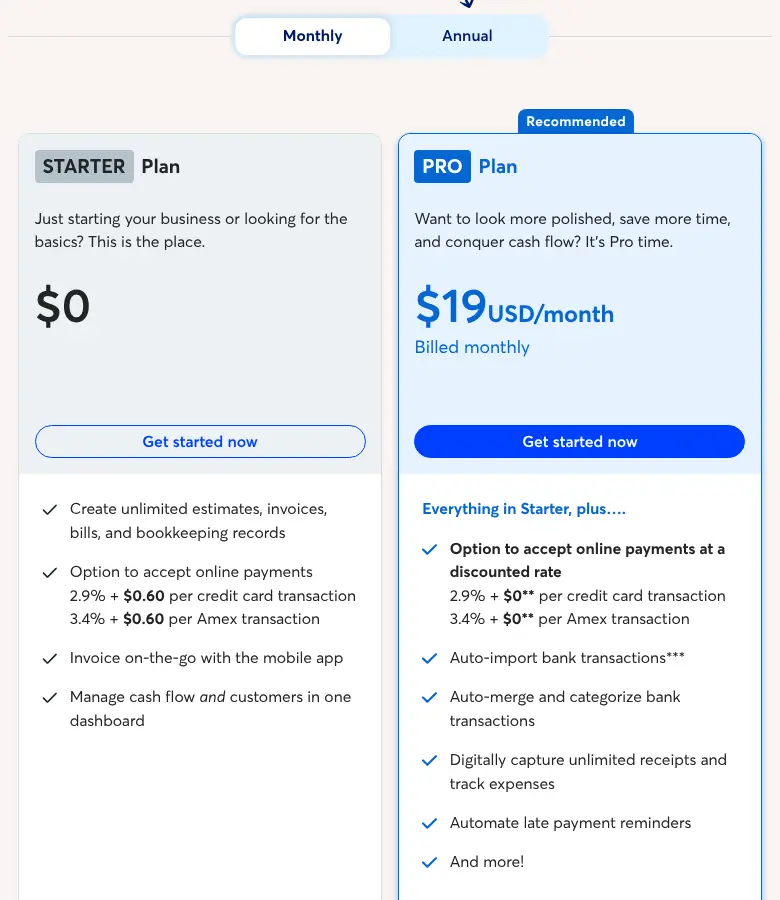
| Wave | Starter $0; Pro $19/month | 2.9% + 60¢ (Pro: no 60¢ on your first 10 a month) | 1%, $1 minimum | Free invoicing plus free bookkeeping in one app |
| Zoho Invoice | $0 (up to 500 invoices a year) | Set by the payment service you connect, such as Stripe or PayPal | Depends on that service | Free automatic reminders, recurring invoices and time tracking |
| Found | $0 with its free business account | 2.9% + 30¢ | See Found’s fee schedule | Sole proprietors who bank with Found |
| FreshBooks | Lite $23/month (5 clients); Plus $43/month (50 clients) | 2.9% + 30¢ | 1% | Freelancers who bill by the hour and invoice lots of clients |
| QuickBooks | Free plan (2 invoices a month unless you turn on QuickBooks Payments); $20/month | 2.99% | 1% | People who already keep their books in QuickBooks |
| Square Invoices | $0; Plus $49/month | 3.3% + 30¢ (Plus: 2.9% + 30¢) | 1%, $1 minimum | Businesses that also take cards in person |
| PayPal | $0 to send | 3.49% + 49¢ paid with PayPal; 2.99% + 49¢ by card | 1%, capped at $10 | Clients who insist on paying with PayPal |
These are regular U.S. list prices and standard rates, checked October 2026. Paid plans often start with a few discounted months, so plan for the full price after that.
What getting paid really costs
Fees on one $1,000 invoice, 2026
What it costs you to get paid
Standard U.S. rates, checked October 2026. Wave adds 60¢ per card payment; PayPal by card is 2.99% + 49¢.
Card fees are about 3% everywhere, so the cheapest app isn’t the one with the lowest card rate. It’s the one that makes bank payments easy for your clients. On a big invoice the gap grows. Say you bill $5,000: paid by card, it costs you about $145; by ACHThe U.S. network for bank-to-bank transfers. A client paying your invoice by ACH usually costs you 1% or less, versus about 3% by card., $50 (PayPal and Square Plus cap it at $10); and by a direct transfer to your account, $0. Our payment fee calculator runs the same math for any invoice amount, including clients abroad.
Which one to pick
Find the line that sounds most like you.
- You’re just starting out: Wave Starter. You get unlimited invoices and estimates, online payments, and free bookkeeping in the same place. Automatic overdue reminders and recurring billing work once online payments are on, or with Pro.
- You want reminders and recurring invoices for free: Zoho Invoice. It’s free for up to 500 invoices a year and 2 users, with a client portal and time tracking. For card payments, you connect a payment service such as Stripe or PayPal.
- You already bank with Found: use its built-in invoicing. It’s free and unlimited, and payments land in the same account that sets aside your taxes.
- You also send contracts and proposals: an all-in-one client app fits better. Bonsai vs. HoneyBook compares the two most people look at.
- You run a trade and quote jobs on site: field service apps add scheduling and quotes. Jobber vs. Housecall Pro compares the two most contractors look at.
- Invoicing is a big part of your admin: FreshBooks. Time tracking, recurring invoices, automatic reminders and late fees are on every plan, and its card rate, 2.9% + 30¢, is in line with the other paid apps. Just watch the client limit: Lite covers 5 billable clients, so busy freelancers usually end up needing Plus at $43. Our FreshBooks review covers every plan and fee.
- Your books are in QuickBooks: invoice from QuickBooks so payments match up automatically. The free plan allows only 2 invoices a month unless you turn on QuickBooks Payments. Torn between it and FreshBooks? Our FreshBooks vs. QuickBooks comparison runs a year of real costs.
- You also sell in person: Square Invoices, so card payments on the spot and invoices end up in one place.
- A client insists on PayPal: send a PayPal invoice for that client only. It’s the priciest way to get paid by card.
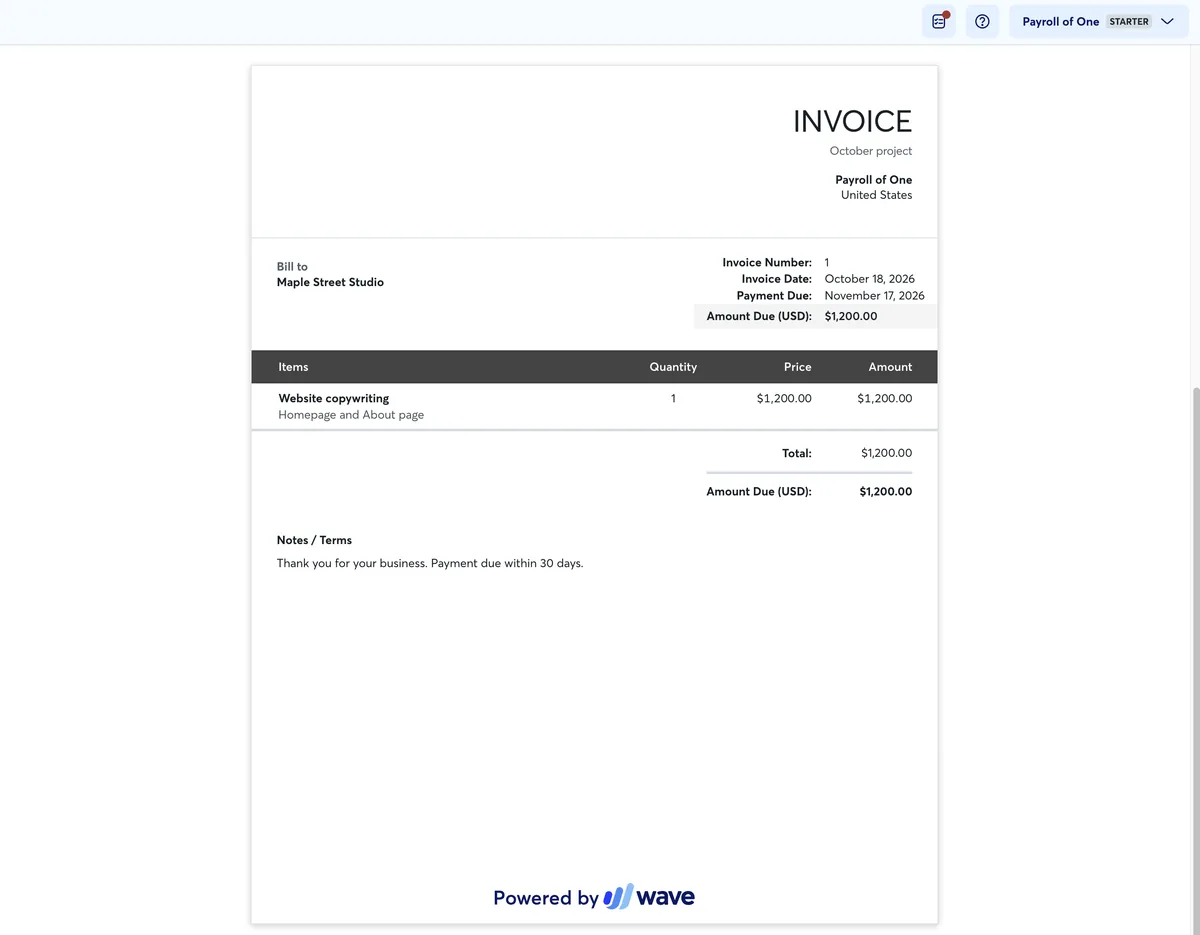
Here’s what a Wave invoice looks like on the free Starter plan. We set up an account and made this one to a made-up client. Your client sees your business name, the line items and the due date, plus a small “Powered by Wave” footer that only Pro removes. Our Wave review covers what else Pro adds.
What a business of one actually needs
You don’t need every feature these apps advertise. Here’s what actually helps when it’s just you.
- A pay-online button with a bank (ACH) option, not just cards.
- Automatic reminders before and after the due date, so you don’t have to chase anyone yourself. Here’s a follow-up schedule that works.
- Recurring invoices if you have retainer clients.
- Estimates and deposits for bigger projects.
- Time tracking if you bill by the hour.
- Payments that land in your business bank account, so your bookkeeping stays clean.
What you can skip: inventory, purchase orders, multiple users and multi-currency, unless you really need them. They’re the usual reason people upgrade to a pricier plan.
Sending only a few invoices a year? You may not need an app yet. Our free freelance invoice template fills in on the page, adds up the total and saves as a PDF.
How to cut payment fees
Here’s how we’d keep more of each payment.
- Offer bank transfer first. Put your business account’s transfer details on the invoice, or turn on the ACH option in your app. Most business clients prefer it anyway.
- Ask big clients to pay by bank transfer. Cards make sense for small invoices and new clients, but on a $5,000 invoice they cost you about $145.
- Build card costs into your rates instead of adding a surcharge. Some states limit surcharges, and card networks have their own rules.
- Watch out for “pay later” buttons. PayPal Pay Later costs you 4.99% + 49¢.
- Take deposits on bigger projects so less money is riding on a single payment.
Every fee you do pay is a deductible business expense, and so is the software. Either way, set aside 25 to 30% of what lands in your account for taxes.
FAQ
Do I need invoicing software at all?
No. A numbered invoice from a template works fine. Software adds a pay-online button, automatic reminders and a record of who owes you what, which is why most freelancers switch once they have a few clients.
Are invoicing app and card fees tax deductible?
Yes. Both are ordinary business expenses on Schedule CThe tax form where you report your business income and expenses. Its bottom line is your profit.. Here’s what else you can deduct.
Will a payment app send me a 1099-K?
A payment app such as PayPal or Venmo sends one if you were paid more than $20,000 across more than 200 payments through it in 2026. Card payments that go through a card processor, including the ones your invoicing app takes for you, can be reported at any amount. Either way, you report all your income. Here’s how the 1099 rules work.
Should my invoicing app and bookkeeping app be the same?
It helps. When they match (Wave, FreshBooks, QuickBooks), payments are recorded for you. Here’s how the bookkeeping apps compare.
Sources
- Wave pricing and Wave processing fees
- Zoho Invoice pricing
- Found pricing and fee schedule
- FreshBooks pricing
- QuickBooks pricing and QuickBooks Payments rates
- Square Invoices pricing
- PayPal business fees
- IRS: Understanding your Form 1099-K
Prices and rates checked October 2026 and change often; confirm on each company’s site before you sign up. General education, not tax advice. Some links on this site may be affiliate links; see our affiliate disclosure. It never changes what we recommend.