The short answer
A client asks if you have a newsletter, or you’ve written a few posts and want readers to come back. Now you’re comparing Kit and beehiiv and both say they’re free.
For most one-person businesses, Kit is the better pick in 2026. Its free plan holds up to 10,000 subscribers, it lets you sell digital products on every plan, and paid plans come with free migration help. Pick beehiiv if the newsletter itself is your product, meaning you plan to earn from ads and paid subscriptions, because beehiiv takes 0% of subscription revenue and runs its own ad network.
We use Kit for our own newsletter, The Quarterly Check-In, so that’s the tool we know best. We’ve ranked both on what a business of one actually pays and uses, using each company’s pricing page and help center.
Check current pricing
Kit vs. beehiiv at a glance
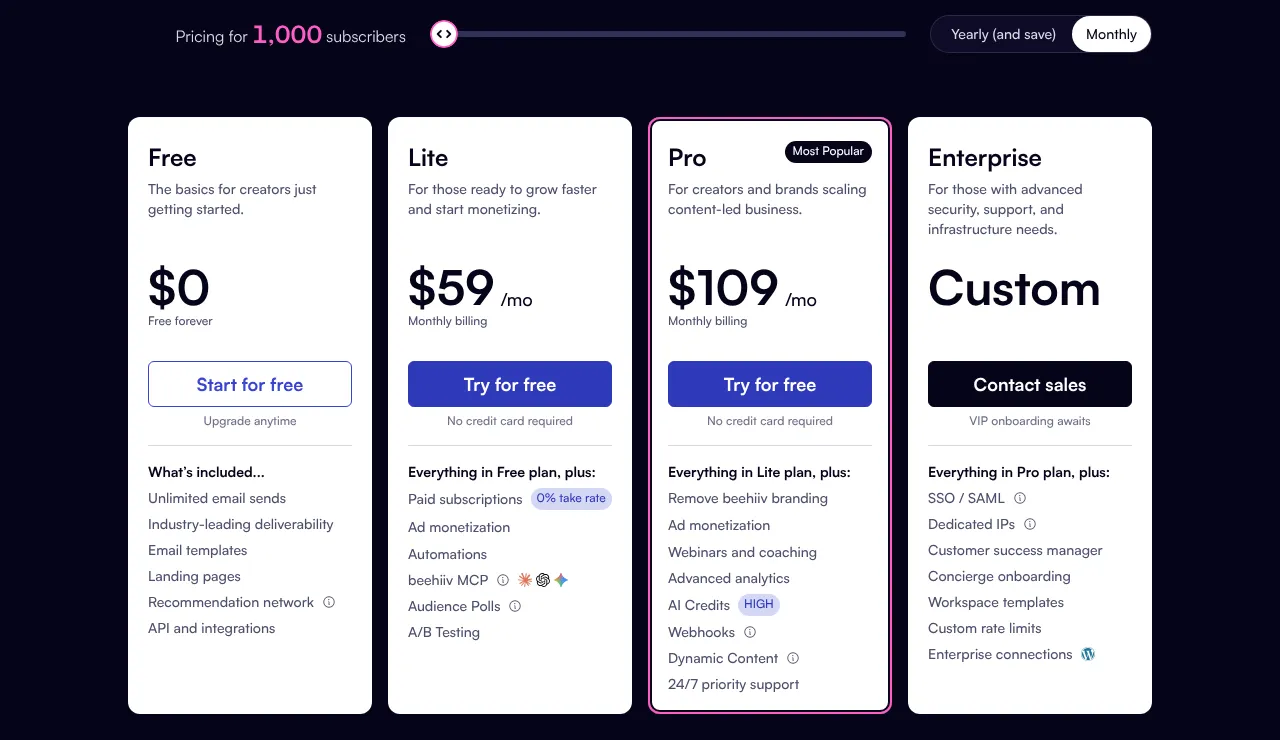
Here’s how the plans line up for a list of 1,000 subscribers, billed monthly:
| Kit | beehiiv | |
|---|---|---|
| Free plan | Up to 10,000 subscribers | Up to 2,500 subscribers |
| Automations on the free plan | None (no sequences) | None |
| Cheapest paid plan | Creator, $39/month | Lite, $59/month |
| Top self-serve plan | Pro, $79/month | Pro, $109/month |
| Remove the platform’s branding | Any paid plan | Pro only |
| Sell digital products | Every plan, including Free | Yes, 0% beehiiv fee |
| Paid subscriptions | Every plan; 3.5% + 30¢ per sale, card processing included | Paid plans; 0% beehiiv fee, plus Stripe’s 2.9% + 30¢ |
| Ad network | No; paid recommendations instead | Yes, on any paid plan |
| Free migration help | Yes, on every paid plan | No; do-it-yourself import |
| Free trial | 14 days, no card | 14 days of Pro, no card |
Prices checked October 14, 2026 on Kit’s and beehiiv’s pricing pages. beehiiv renamed its plans on October 1, 2026 (Launch, Scale and Max became Free, Lite and Pro). Both offer about two months free if you pay yearly.
Monthly price at 1,000 subscribers · October 2026
What each plan costs
Monthly billing. Prices rise with your list: at 10,000 subscribers, beehiiv Lite is $139 a month and Pro is $239.
Where Kit wins
Kit was built for creators who sell things, and a business of one usually fits that description. Here’s what tips it in Kit’s favor.
- A free plan you won’t outgrow soon. Kit’s free plan covers up to 10,000 subscribers with unlimited emails, forms and landing pages. beehiiv’s free plan stops at 2,500.
- Selling on every plan. You can sell a template, a guide or a paid newsletter on Kit’s free plan. Kit charges 3.5% + 30¢ per sale, and that covers the card processing too.
- Automations for less. Kit’s Creator plan ($39 a month) includes unlimited email sequencesA set of emails that send themselves on a schedule after someone signs up, like a three-part welcome series. and visual automations, like a welcome series that sends itself. beehiiv’s Lite plan costs $59 and allows 10.
- Free help moving over. Every paid Kit plan includes migration. Under 10,000 subscribers, Kit’s team moves your subscribers, tags and segments in 2 to 5 business days.
- Your name, not theirs. Any paid Kit plan removes the “Built with Kit” badge. On beehiiv, only Pro ($109) removes its branding.
Our Kit link: if Kit is the right fit, you can start free through our Kit link. You get the same free plan and the same prices. We earn a commission if you later move to a paid plan. We picked Kit before we joined its affiliate program, and the commission doesn’t change our pick.
Where beehiiv wins
beehiiv was built for newsletters that run like small media businesses. If you want the newsletter to pay for itself through sponsors and subscribers, it has the stronger toolkit.
- A built-in ad network. On any paid plan, beehiiv can place sponsor ads in your emails and pay you for them, with no subscriber minimum stated. Kit has no ad network; its Creator Network pays you for recommending other newsletters instead.
- 0% of your subscription revenue. beehiiv takes nothing from paid subscriptions or digital products. You pay Stripe’s standard 2.9% + 30¢, which is a little less than Kit’s 3.5% + 30¢.
- A website included. Every beehiiv newsletter gets a web archive and pages (1 on Free, 5 on Lite, unlimited on Pro), so a post can rank in Google too.
- A referral program on the mid-tier plan. beehiiv’s Lite plan includes a “refer a friend” program. On Kit, that’s Pro only.
Our reader offer: if beehiiv is the right fit, sign up through our beehiiv link and you get a 14-day free trial plus 20% off your first 3 months on a paid plan. We earn a commission if you upgrade. It doesn’t change our pick.
What it costs as your list grows
Both companies price by subscriber count, so the bill climbs as your list does. Say you grow to 3,000 subscribers. Kit’s Creator plan goes from $39 to $59 a month. beehiiv bills a 3,000-person list at its 5,000 tier, so Lite goes from $59 to $109.
Kit’s free plan matters most here. You could reach 10,000 subscribers without paying anything, as long as you can live without automations and the Kit badge. On beehiiv you’d hit the free plan’s ceiling at 2,500.
One more thing to know: Kit raised its prices in October 2025, its first increase in 12 years. beehiiv customers who signed up before October 1, 2026 keep their old prices until their first renewal on or after November 1, 2026.
Which one fits your business
The deciding question is simple: is the newsletter a tool for your business, or is it the business?
- Choose Kit if you’re a freelancer, consultant or solo founder who wants to stay in touch with clients, send a welcome series, or sell a template, course or guide. Start free and move to Creator when you need automations.
- Choose beehiiv if you’re building a publication and want sponsor money and paid subscribers to be the income. Plan on the $59 Lite plan, since the ad network and paid subscriptions aren’t on Free.
- Either works if you just want to send a monthly update. Pick the one whose editor you like, because you’ll be the one using it.
Our take: don’t let the choice stop you from starting. Both let you export your full subscriber list to a CSV file on any plan, so switching later costs you an afternoon, not your audience.
Still weighing MailerLite, Substack or Mailchimp too? Our best newsletter platform comparison puts all five side by side. Torn between beehiiv and Substack? Our beehiiv vs. Substack comparison shows where each one costs less as readers start paying. Selling physical products? Here’s the best email marketing for online stores.
The tax side of a newsletter
A newsletter that earns money is part of your business, and the IRS treats it that way.
- The subscription is a write-off. What you pay Kit or beehiiv is a business expense on Schedule C. Here are the other write-offs most freelancers miss.
- What it earns is taxable, form or no form. Ad payouts, sponsorships, paid subscriptions and product sales all count as business income, even if no 1099-NEC or 1099-K arrives. Here’s how creator income is taxed, free products included.
- Set some aside. Self-employment tax applies to newsletter profit like any other. Most people in your spot move 25 to 30% of each payout to a separate tax account the day it lands.
- Keep the money separate. Payouts that land in a business bank account, not a personal one, keep your books clean.
FAQ
Is Kit or beehiiv better for beginners?
Both are easy to start with. Kit’s free plan gives you more room (10,000 subscribers vs. 2,500), so it’s the safer place to start if you’re not sure where the newsletter is going.
Is Kit the same as ConvertKit?
Yes. ConvertKit renamed itself Kit, and its old Creator Pro plan is now called Pro.
Can I move from Kit to beehiiv, or back?
Yes. Both export your subscribers to a CSV file on every plan. Kit’s paid plans include free migration help; beehiiv offers a do-it-yourself import.
Do I need a business address to send a newsletter?
Yes. U.S. law requires a valid postal address in every marketing email. A P.O. box or a registered private mailbox works if you’d rather not show your home address. Here’s how to set one up.
Which one makes more money from ads?
beehiiv, because it has its own ad network on every paid plan. Kit pays through recommendations and lets you sell sponsorships yourself.
Can I deduct what I pay for my newsletter tool?
Yes, if the newsletter is for your business. It’s an ordinary business expense on Schedule CThe tax form where you report your business income and expenses. Its bottom line is your profit..
Sources
- Kit pricing
- Kit: the free plan
- Kit: billing
- Kit: free migrations
- beehiiv pricing
- beehiiv: plan types
- beehiiv: ad network FAQ
- FTC: CAN-SPAM Act compliance guide
- IRS: Self-employed individuals tax center
Prices checked October 14, 2026 and change often; confirm on each company’s site before you sign up. General education, not legal or tax advice. Our picks are never ranked by payment from the companies listed.