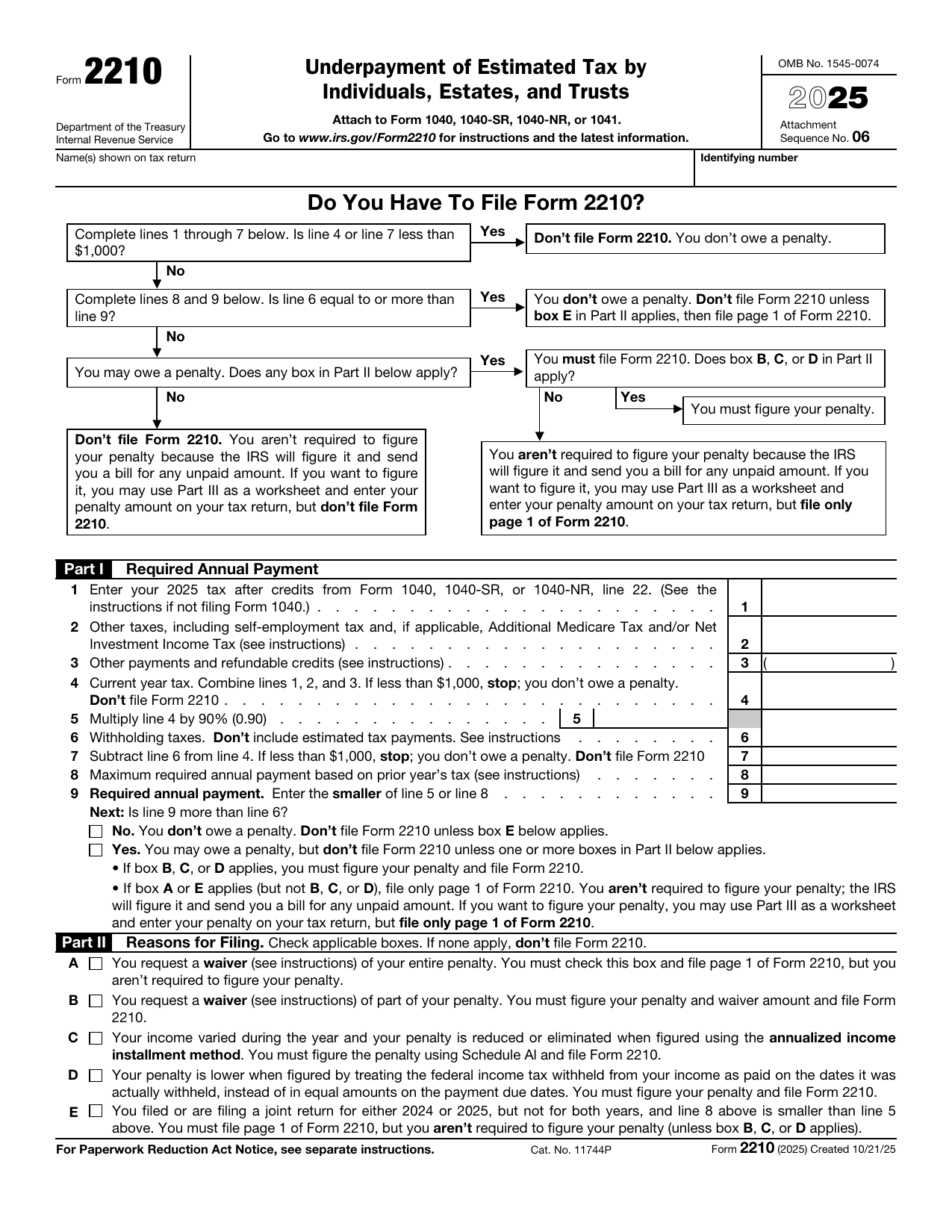
Tap any line on the formHover over any line on the form to see what it means. Click a line to pin its note open so you can use the links. to see what it means. Our example is Maya, the freelance designer from our Form 1040-ES page: $14,993 of total tax for 2026, $12,000 of total tax on her 2025 return, and no withholding. She paid $3,000 on April 15 and June 15, then nothing more, so she paid in only $6,000. These are 2026 numbers on the 2025 form.

Swipe sideways to see the whole form.
Every line, in plain English
Name Your name, as on your return
The name or names exactly as they appear on the tax return you attach this to. On a joint return, both spouses' names go here.
ExampleMaya writes her own name, as on her Form 1040.
Identifying number Your Social Security number
For a person, this is your Social Security number (or ITIN). On a joint return, use the first number shown on the return. Estates and trusts use their EIN.
ExampleMaya enters her Social Security number.
Flowchart Do you even have to file this form?
Most people who owe the penalty never file Form 2210. The flowchart sends you through Part I first. If line 4 or line 7 is under $1,000, or your withholding on line 6 already covers line 9, you owe nothing. If you might owe, you only file the form when a box in Part II applies. Otherwise the IRS works out the penalty and mails you a bill.
ExampleMaya's lines 4 and 7 are $14,993 and her line 6 is 0, so she may owe a penalty. None of the Part II boxes apply to her, so she doesn't have to file Form 2210 at all.
Our tipYou can still use Part III as a worksheet and put the penalty on your return yourself. Tax software usually does exactly that.
Line 1 Your income tax after credits
Your income tax for the year after nonrefundable credits like the child tax credit. On the 2025 form it comes from Form 1040, line 22. Self-employment tax isn't in this number yet. It comes on line 2.
ExampleMaya's 2026 income tax is $4,704.
Line 2 Other taxes, including self-employment tax
Taxes from Schedule 2 that count toward the penalty, the biggest one for freelancers being self-employment tax from Schedule SE. It also picks up the Additional Medicare Tax, the Net Investment Income Tax and, in some cases, household employment taxes for a nanny.
ExampleMaya's self-employment tax is $10,289.
Our tipFor most freelancers this is the bigger of the first two lines.
Line 3 Refundable credits
Credits that can be paid out to you even beyond your tax, such as the earned income credit, the additional child tax credit, the refundable part of the American opportunity credit and the premium tax credit. You enter them in parentheses because they reduce your tax.
ExampleMaya has none, so she enters 0.
Line 4 This year's tax
Lines 1 and 2 minus line 3. This is the tax the penalty is measured against. If it's under $1,000, you stop: there's no penalty and no form to file.
ExampleMaya: $4,704 + $10,289 − $0 = $14,993, the same total as her Form 1040-ES worksheet.
Line 5 90% of this year's tax
Line 4 times 90%. Paying this much on time is the first of the two safe harbors. Farmers and fishers use 66⅔% instead, on Form 2210-F.
ExampleMaya: $14,993 × 90% = $13,494.
Line 6 Tax withheld from paychecks
Federal income tax withheld from a W-2 job, a pension or other payments (Form 1040, line 25d on the 2025 form). Don't include your estimated tax payments here. They go in Part III.
ExampleMaya has no job and no withholding, so line 6 is 0.
Our tipHave a day job too? Withholding counts as paid evenly through the year, even if it came out late, so raising it in the fall can cover earlier quarters.
Line 7 The $1,000 test
Line 4 minus line 6: what you'd owe if you hadn't made any estimated payments. If it's under $1,000, you stop. There's no penalty.
ExampleMaya: $14,993 − $0 = $14,993, far above $1,000, so she keeps going.
Line 8 Last year's tax
Your total tax from the year before, the second safe harbor. It's roughly last year's Form 1040, line 22 plus the same Schedule 2 taxes, minus refundable credits. If last year's adjusted gross income was over $150,000 ($75,000 married filing separately), use 110% of it. If you didn't file last year, or it wasn't a full 12 months, leave line 8 blank.
ExampleMaya's total tax on her 2025 return was $12,000, and her income was under $150,000, so she enters $12,000.
Our tipYou know this number in January, which is why it's the safe harbor we'd plan around.
Line 9 Your required annual payment
The smaller of line 5 or line 8. This is what you needed to pay in during the year, through withholding and estimated payments, to owe no penalty at all. If you skipped line 8, enter line 5 here.
ExampleMaya: the smaller of $13,494 and $12,000 is $12,000. That's $3,000 per due date.
Our tipThis is the number to aim for next year, split into four payments.
Next Is line 9 more than line 6?
If your withholding already covers line 9, you check No and owe no penalty. If not, you check Yes: you may owe one, but you only file Form 2210 when a box in Part II applies. With box B, C or D you must figure the penalty yourself. With only A or E, you file page 1 and the IRS figures it.
ExampleMaya: $12,000 is more than $0, so she checks Yes.
Box A Asking to waive the whole penalty
For when the IRS might waive the penalty: you retired after age 62 or became disabled this year or last and had a reasonable cause, or a casualty, disaster or other unusual event caused the shortfall. You check the box, file page 1 and attach a statement with your reasons and proof, like your retirement date or an insurance report. You don't have to figure the penalty.
ExampleMaya forgot two payments, which isn't a reason the IRS waives this penalty, so she leaves it blank.
Our tipIn a federally declared disaster area the IRS usually applies relief on its own, so you don't need this box.
Box B Asking to waive part of the penalty
The same reasons as box A, but for only part of the penalty, such as one quarter. Here you have to figure the whole penalty, write the amount you want waived next to line 19, and attach your explanation.
ExampleMaya leaves it blank.
Box C The annualized income method
For when your income came late in the year. Instead of four equal installments, Schedule AI on page 3 sets each one by what you had actually earned by then, which can shrink or wipe out the penalty for early quarters. You must figure the penalty and file the whole form.
ExampleMaya earned steadily all year, so it wouldn't help her. If most of her income had come in the fall, it could.
Our tipIf you use it for one due date, you have to use it for all four.
Box D Withholding on the dates it was taken
Normally withholding counts as paid in four equal parts on the due dates. If more of yours was taken early in the year, you can count it on the actual dates instead. You must figure the penalty and file the form.
ExampleMaya has no withholding, so it doesn't apply.
Box E A joint return one year but not the other
For when you filed jointly last year but not this year, or the other way round, and line 8 is smaller than line 5. You file page 1, but you don't have to figure the penalty unless box B, C or D also applies.
ExampleMaya files single both years, so she skips it.
Columns (a) to (d) The four due dates
Each column is one quarterly due date, and every line below is worked out for each one separately. The 2025 form shows April 15, June 15 and September 15, 2025 and January 15, 2026. For 2026 they're April 15, June 15 and September 15, 2026 and January 15, 2027.
ExampleMaya fills in a column for each of her four 2026 due dates.
Our tipThe penalty is figured per payment, so paying extra in January doesn't erase a penalty on an earlier quarter.
Line 10 What you should have paid each time
A quarter of line 9 in each column, unless you checked box C, in which case these come from Schedule AI, line 27.
ExampleMaya: $12,000 × 25% = $3,000 in each column.
Line 11 What you actually paid
The estimated payments you made in each period, plus a quarter of your withholding in each column (unless you checked box D). A refund from last year that you applied to this year usually counts as paid on April 15. Column (a) is payments through April 15, (b) through June 15, (c) through September 15 and (d) through January 15. If line 11 is at least line 10 in every column, you stop: no penalty.
ExampleMaya: $3,000, $3,000, 0 and 0.
Our tipMailed payments count on the postmark date.
Line 12 Extra carried in from the last column
Any overpayment from line 18 of the column before. Paying ahead in one quarter carries forward to the next. Column (a) is shaded because nothing comes before it.
ExampleMaya never paid more than $3,000 at a time, so line 12 is 0 in every column.
Line 13 Total available for this due date
Lines 11 and 12 added together.
ExampleMaya: $3,000 in column (b), 0 in columns (c) and (d).
Line 14 Shortfalls carried in from before
Lines 16 and 17 from the column before. Your payments always go to the oldest shortfall first, even if you meant them for a later quarter.
ExampleMaya: 0 in columns (b) and (c). In column (d) it's $3,000, the September shortfall.
Line 15 What's left to count toward this payment
Line 13 minus line 14, never less than 0. In column (a) you just copy line 11.
ExampleMaya: $3,000 in columns (a) and (b), 0 in columns (c) and (d).
Line 16 A shortfall still unpaid
If line 15 is 0, this is how much of an earlier shortfall your payments still haven't covered (line 14 minus line 13). It carries to line 14 of the next column.
ExampleMaya: 0 in columns (b) and (c).
Line 17 Your underpayment
If line 15 is less than line 10, the difference is your underpayment for that due date. This is the amount the penalty is charged on. If line 17 is 0 in every column, you owe no penalty.
ExampleMaya: 0 for April and June, $3,000 for September and $3,000 for January, $6,000 in all.
Our tipPay a missed amount as soon as you notice: the penalty on it stops growing the day it's paid.
Line 18 Your overpayment
If line 15 is more than line 10, the extra goes here and carries to line 12 of the next column.
ExampleMaya paid exactly $3,000 twice, so she has no overpayment.
Line 19 The penalty
The total from the penalty worksheet in the Form 2210 instructions. For each underpayment on line 17, it multiplies the amount by the IRS interest rate and by the number of days it stayed unpaid, up to the April filing deadline. The rate is set each quarter: 7% a year for the last quarter of 2026. On the 2025 form, the total goes on Form 1040, line 38.
ExampleMaya pays the rest of her tax with her return on April 15, 2027. Her September shortfall is late 212 days and her January one 90 days. At 7% that's about $122 + $52, or roughly $174. The exact figure depends on the rates the IRS sets for early 2027.
Our tipUnless you checked a box in Part II, you can leave this line blank and let the IRS send a bill. There's no interest on that penalty if you file on time and pay it by the date on the bill.
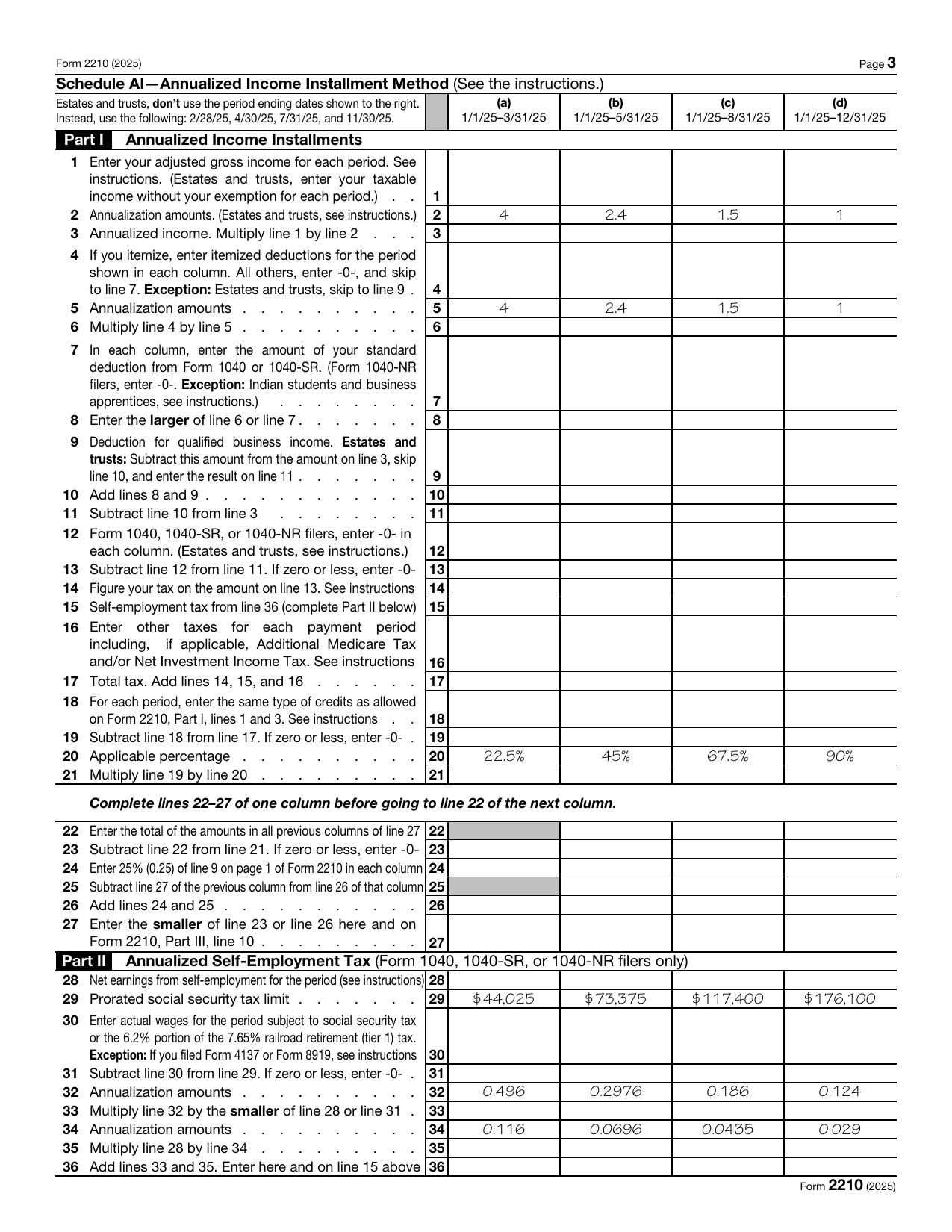
Schedule AI columns Four periods that each start on January 1
Each column covers the year so far: through March 31, May 31, August 31 and December 31. Every column includes everything from the earlier ones. You only fill in Schedule AI if you checked box C.
ExampleMaya earned steadily, so she'd skip this page. The examples below show what it would look like if her income had come late.
Lines 1 to 3 Your income so far, scaled up to a full year
Line 1 is your adjusted gross income for each period (after the deduction for half your self-employment tax). Line 2 multiplies it by 4, 2.4, 1.5 and 1, which turns three months of income into a full year's worth, five months into a year, and so on. Line 3 is the result.
ExampleSay Maya's adjusted gross income through March 31 was only $8,000. Column (a), line 3: $8,000 × 4 = $32,000 a year, far less than her real $67,680.
Lines 4 to 8 Deductions for each period
If you itemize, you enter what you'd paid so far and scale it up the same way. Everyone else enters 0 on line 4 and puts the full standard deduction on line 7 in each column. Line 8 is the larger of the two.
ExampleMaya doesn't itemize, so line 8 is her full standard deduction in every column.
Lines 9 to 13 Annualized taxable income
Line 9 is the qualified business income deduction for each period, figured the way Form 8995 does it. Line 13 is your annualized income minus your deductions: the taxable income you'd have if you kept earning at that pace all year. Individuals enter 0 on line 12.
ExampleFor Maya's slow first quarter, column (a) would show a much smaller taxable income than her real one.
Lines 14 to 17 Tax on that income
Line 14 is income tax on line 13, using the normal tax tables. Line 15 is self-employment tax from Part II below. Line 16 is other taxes for the period, such as the Additional Medicare Tax. Line 17 adds them up.
ExampleLower annualized income in column (a) means lower tax there too.
Lines 18 to 21 How much of it was due so far
Line 18 subtracts credits for each period. Line 20 is the share of the year's tax that was due by each date: 22.5%, 45%, 67.5% and 90%. Those are just the 90% safe harbor split into quarters. Line 21 multiplies the two.
ExampleIf Maya's annualized tax in column (a) were $5,000, line 21 would be $5,000 × 22.5% = $1,125, instead of the regular $3,000.
Lines 22 to 27 Your installment for each due date
Line 24 is the regular installment, a quarter of line 9 on page 1. The schedule compares it with the annualized amount and keeps the smaller one on line 27. Anything a smaller installment saves you is added back in later columns, so the year still adds up to the full amount. Line 27 goes to Part III, line 10.
ExampleMaya's line 24 is $3,000 in every column. With the slow first quarter above, line 27 in column (a) would be $1,125.
Lines 28 to 31 Self-employment earnings so far
Line 28 is your business profit for each period times 92.35%, the same step as Schedule SE. Line 29 is the Social Security wage base, split by period: $176,100 for the full year on the 2025 form ($184,500 for 2026). Line 30 is any W-2 wages that already used part of it, and line 31 is what's left.
ExampleIf Maya's profit through March 31 were $8,000, line 28 in column (a) would be $8,000 × 92.35% = $7,388.
Lines 32 to 36 Annualized self-employment tax
The printed amounts combine the 12.4% Social Security rate and the 2.9% Medicare rate with each period's scaling factor (0.496 is 12.4% × 4). Line 33 is the Social Security part, line 35 the Medicare part, and line 36 adds them and goes to line 15 above.
ExampleColumn (a) for Maya: $7,388 × 0.496 = $3,664 plus $7,388 × 0.116 = $857, so $4,521 of annualized self-employment tax.
