Tap any line on the formHover over any line on the form to see what it means. Click a line to pin its note open so you can use the links. to see what it means. Our example is the one-person S-corp from our Form 1120-S decoder: a consulting LLC whose S-corp election took effect January 1, 2026. It pays you a $50,000 salary, $12,500 a quarter, and withholds $500 a month of federal income tax based on your W-4. We fill in the third quarter of 2026 (July to September). The form is the March 2026 revision, which the IRS plans to use for all four quarters of 2026.


Swipe sideways to see the whole form.
Every line, in plain English
EIN Employer identification number
Your S-corp's nine-digit EIN, the same number on its 1120-S and your W-2. Never your Social Security number. If the EIN hasn't arrived by the due date, the instructions say to file on paper and write "Applied For" and the date you applied.
ExampleYou enter the LLC's EIN.
Our tipThe IRS matches everything by this number, so a typo here can send your deposits to nowhere.
Name The business's legal name
The legal name the business used when it applied for its EIN. For an LLC taxed as an S-corp, that's the LLC's name, including "LLC", not your own name.
ExampleYou enter the LLC's name exactly as it appears on its EIN letter.
Trade name A different name you do business under
Only fill this in if the business operates under a name that isn't its legal name, like a DBA. If it's the same, the instructions say to leave it blank.
ExampleYour LLC does business under its own name, so you leave it blank.
Address The business's mailing address
Where the IRS should send mail about your payroll taxes, with the suite or room number in its own box. If the address changes, the instructions say to tell the IRS on Form 8822-B, which you mail separately, not with the 941.
ExampleYou enter the address the LLC uses on its other tax forms.
Foreign address Only for an address outside the U.S.
The country, province and postal code boxes are for a business with a foreign mailing address.
ExampleYour business is in the U.S., so these stay blank.
Quarter Which quarter this return covers
Check one box: 1 for January to March, 2 for April to June, 3 for July to September, 4 for October to December. Each quarter gets its own 941, due by the last day of the month after the quarter ends.
ExampleYou check box 3 for July, August and September. It's due October 31, which is a Saturday in 2026, so it moves to Monday, November 2.
Our tipIf you deposited all the quarter's tax on time, you can file by the 10th of the second month after the quarter instead: November 10, 2026 for this one.
Aggregate filers Only for agents filing for many employers
New for 2026. These boxes are for section 3504 agents, certified professional employer organizations and other third parties that combine several employers' payroll on one 941. A regular business filing its own return leaves them blank.
ExampleYou leave all three boxes empty.
Our tipA payroll service that files a 941 just for your business, under your EIN, isn't filing an aggregate return.
Line 1 Number of employees
How many employees were on the payroll for the pay period that includes the 12th of the quarter's last month: March 12, June 12, September 12 or December 12. As an S-corp owner who works in the business, you count, because the corporation employs you.
ExampleYour September payroll includes September 12, and you're the only one on it, so you enter 1.
Line 2 Wages, tips and other compensation
The pay you gave employees this quarter that also goes in box 1 of their W-2s. It's the amount before any withholding comes out.
ExampleYou're paid once a month, and the three paychecks come to $12,500.00. Add up line 2 on all four 941s and you get the $50,000 on your W-2 and on Form 1120-S, line 7.
Our tipIf the S-corp pays your health insurance, the premiums count here, because they're in box 1 of your W-2. They stay out of lines 5a and 5c, since they aren't subject to Social Security or Medicare tax.
Line 3 Federal income tax withheld
The federal income tax taken out of paychecks this quarter, based on each employee's Form W-4. It's your own income tax, paid in advance, not an extra tax on the business. State income tax doesn't go on this form.
ExampleYour W-4 has $500 a month withheld, so you enter $1,500.00. Over the year that's $6,000. Your $2,000 of state withholding goes on your state's payroll return, not here.
Our tipYou can also have extra withheld to cover tax on your S-corp profit, using Step 4(c) of your W-4, instead of making estimated payments.
Line 4 No wages subject to Social Security or Medicare
Check this only if none of the pay on line 2 is subject to Social Security or Medicare tax, which is rare. Then you skip to line 6.
ExampleYour salary is subject to both taxes, so you leave the box empty.
Line 5a Taxable Social Security wages
In column 1, the wages this quarter that are subject to Social Security tax, before deductions. Column 2 is that amount times 0.124: the 6.2% withheld from the employee plus the 6.2% the company pays. For 2026, Social Security stops once an employee's pay reaches $184,500 for the year.
ExampleColumn 1 is $12,500.00. Column 2 is $12,500 × 0.124 = $1,550.00: $775 from your paycheck and $775 from the company.
Our tipBoth halves land on this one line. Over the year that's $3,100 from each side.
Line 5b Taxable Social Security tips
Tips your employees reported to you, which carry the same 12.4% Social Security tax as wages. Allocated tips don't go here.
ExampleNobody tips a consultant, so you leave it blank.
Line 5c Taxable Medicare wages and tips
All wages and tips subject to Medicare tax. Column 2 is that amount times 0.029: 1.45% from the employee and 1.45% from the company. Unlike Social Security, Medicare has no yearly cap.
ExampleColumn 1 is $12,500.00 again. Column 2 is $12,500 × 0.029 = $362.50: $181.25 from each side.
Line 5d Wages subject to Additional Medicare Tax
Once an employee's pay passes $200,000 for the year, you withhold an extra 0.9% on the amount above it. Only the employee pays it; the company has no matching share.
ExampleYour salary is far below $200,000, so you leave it blank.
Line 5e Total Social Security and Medicare taxes
Column 2 of lines 5a to 5d added together. It's both halves of Social Security and Medicare for the quarter.
Example$1,550.00 + $362.50 = $1,912.50. The company's half, $956.25 a quarter, adds up to the $3,825 that's part of line 12 on your 1120-S.
Line 5f Tax on unreported tips from an IRS notice
Only if the IRS sent you a Section 3121(q) Notice and Demand for Social Security and Medicare tax on tips that employees didn't report to you.
ExampleYou've never had one, so it's blank.
Line 6 Total taxes before adjustments
Line 3 plus lines 5e and 5f: the income tax withheld plus all the Social Security and Medicare tax.
Example$1,500.00 + $1,912.50 = $3,412.50.
Line 7 Adjustment for fractions of cents
Each paycheck rounds the employee's share to the cent, so what was actually withheld can be a few cents off the math on lines 5a to 5d. This line fixes that, up or down. Use a minus sign for a decrease.
ExampleYour payroll service's withholding matched the math to the cent, so you leave it blank.
Our tipA few cents here is normal. A bigger number is a sign something in payroll needs a look.
Lines 8 and 9 Adjustments for sick pay, tips and group-term life insurance
Line 8 is for sick pay that an insurance company paid and withheld tax on. Line 9 takes off the employee share of Social Security and Medicare you couldn't collect on tips, or on group-term life insurance for former employees. Both are usually negative numbers.
ExampleNone of these apply to you, so both lines are blank.
Line 10 Total taxes after adjustments
Line 6 combined with the adjustments on lines 7 to 9.
ExampleWith no adjustments, it's the same as line 6: $3,412.50.
Line 11 Research payroll tax credit
A qualified small business can use part of its research credit against the company's share of Social Security and Medicare tax. It's elected on Form 6765 with the income tax return, then claimed here with Form 8974 attached.
ExampleYour consulting work doesn't involve qualified research, so it's blank.
Line 12 Total taxes for the quarter
Line 10 minus line 11: the quarter's total payroll tax. This number decides how you pay. If it's under $2,500 this quarter or last, you can pay it with the return. Otherwise you must have deposited it during the quarter, and the total on line 16 must equal it.
ExampleYou enter $3,412.50. It's over $2,500 and so was last quarter's, so you deposited it month by month.
Our tipNever leave this line blank, even if it's zero. The instructions list it, with lines 1 and 2, as the only lines that need a number either way.
Line 13 Total deposits for this quarter
Every payroll tax deposit you made for the quarter, plus any overpayment from an earlier quarter you applied to this one.
ExampleYou deposited $1,137.50 for each month, so you enter $3,412.50.
Our tipDeposits go in electronically, through EFTPS, IRS Direct Pay or your IRS business tax account. A full-service payroll company makes them for you.
Line 14 Balance due
If line 12 is more than line 13, the difference goes here. If you had to make deposits and made them all on time, this should be zero. You don't have to pay a balance under $1.
ExampleYour deposits match line 12, so line 14 is blank.
Our tipPaying with the return when you were supposed to deposit can bring a penalty, so treat a balance here as a sign to check your deposits.
Line 15a Overpayment
If line 13 is more than line 12, you deposited too much, and the difference goes here. Never fill in both line 14 and line 15a.
ExampleYou deposited exactly the right amount, so it's blank.
Line 15b Apply it or get it back
Check one box: apply the overpayment to your next 941, or send a refund. If you check neither or both, the IRS generally applies it to your next return.
ExampleNo overpayment, so no box.
Our tipFor a small amount, applying it to next quarter is the simplest choice.
Lines 15c to 15e Direct deposit for a refund
New for 2026: Form 941 refunds now go by direct deposit. Enter the nine-digit routing number, check checking or savings, and enter the account number. Use the business's bank account, since the instructions say a refund can be rejected if the name on the account doesn't match.
ExampleNo refund this quarter, so these stay blank.
Our tipIf you ask for a refund but skip these lines, the instructions warn your refund may be delayed.
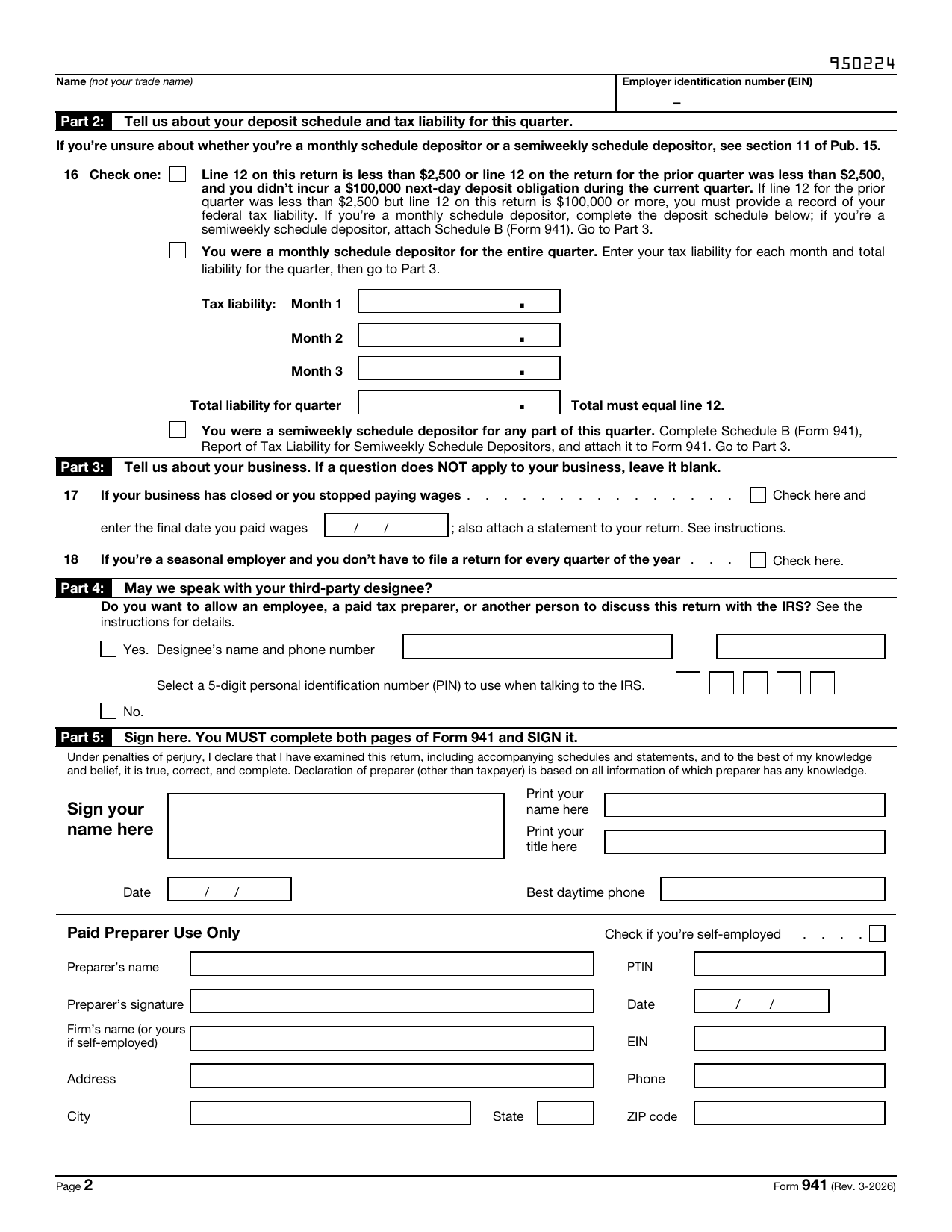
Name and EIN Your name and EIN again
Repeat the business's legal name and EIN at the top of page 2, so the pages can be matched if they're separated.
ExampleYou enter the LLC's name and EIN, the same as page 1.
Line 16, box 1 Under $2,500 a quarter
Check this if line 12 is under $2,500 this quarter, or was under $2,500 last quarter, and you didn't owe $100,000 or more in a single day this quarter. Then you skip the rest of line 16 and go to Part 3.
ExampleYour line 12 is $3,412.50 this quarter and was last quarter too, so this isn't your box.
Our tipA lower salary changes this. On a $36,000 salary, with the same rates, a quarter's tax could fall under $2,500 and you could pay it with the return.
Line 16, box 2 Monthly depositor: your tax by month
Check this if you were a monthly schedule depositor for the whole quarter, then enter the tax for each month and the total. Every new employer is a monthly depositor in its first calendar year. After that, you stay one as long as your 941s for the lookback period (July 1, 2024 to June 30, 2025 for 2026) totaled $50,000 or less. Enter the tax by the month you paid the wages, not the month you deposited it.
ExampleYou check the box and enter $1,137.50 for each month: $500 of withholding plus $637.50 of Social Security and Medicare. The total, $3,412.50, matches line 12.
Our tipThe total has to equal line 12. If it doesn't, the IRS may not count your deposits as on time.
Line 16, box 3 Semiweekly depositor
For employers whose lookback period had more than $50,000 of payroll tax, or that owed $100,000 in one day. They check this box and attach Schedule B (Form 941) with their tax liability by payday.
ExampleA one-person S-corp almost never gets there, so you skip it.
Line 17 Business closed or stopped paying wages
Check this on your final 941 if the business closes or stops paying wages for good, enter the last date you paid wages, and attach a statement naming who keeps the payroll records and where.
ExampleYour business is running, so you leave it blank.
Our tipUntil you file a final return, the IRS expects a 941 every quarter, so don't just stop filing.
Line 18 Seasonal employer
For businesses that only pay wages part of the year, like a summer camp. Checking it on every 941 tells the IRS not to expect a return for the quarters with no wages.
ExampleYou pay yourself every month, so it's blank.
Our tipIf you skip payroll for a quarter without being seasonal, you still file a 941 for it, showing zero.
Part 4 Who the IRS can talk to about this return
Check Yes to let a specific person, like your bookkeeper or the person who prepares the return, answer the IRS's questions about this 941. You give their name, phone number and a five-digit PIN they choose. It doesn't let them represent you, and it ends a year after the return's due date.
ExampleYou don't need anyone else to speak for this return, so you check No.
Part 5 Signature, title, date and phone
For a corporation, including an LLC taxed as a corporation, the president, vice president or another principal officer signs. Print your name and title, date it, and give a daytime phone number. Both pages have to be filled in before you sign.
ExampleYou sign as president, the same title you use on your 1120-S, and give your cell number.
Our tipThe instructions warn that a 941 that isn't signed, or has a blank page, can be delayed in processing.
Paid preparer Paid Preparer Use Only
Filled in only by someone you paid to prepare the return who isn't your employee. A payroll company filing as your reporting agent, with Form 8655 on file, generally leaves this section blank.
ExampleNobody outside the company prepared it, so it's blank.
Voucher, box 1 Your EIN on the voucher
You only use Form 941-V when you pay a balance due by check or money order. Box 1 is the business's EIN, the same as on the 941.
ExampleYour deposits covered everything, so you don't need the voucher at all.
Our tipPaying online instead? Skip the voucher entirely. The instructions say not to send it if you pay electronically.
Voucher, box 2 The amount you're paying
The amount of your check, which should be the balance on line 14. Make the check out to "United States Treasury" and write your EIN, "Form 941" and the quarter on it.
ExampleNo balance due, so no check.
Our tipOnly pay with the return if line 12 was under $2,500 this quarter or last, or under the accuracy-of-deposits rule. Otherwise that tax had to be deposited.
Voucher, box 3 Tax period
Fill in one circle for the quarter the payment is for.
ExampleIf you were paying for July to September, you'd fill in 3rd Quarter.
Voucher, box 4 Business name and address
The business's name and address, exactly as on the 941. Send the voucher and check loose with the return, without staples.
ExampleYou'd enter the LLC's name and address.
